
Simplified Chinese Keyboard1.8.6 - Google Play
You'll be able to see results in few seconds.
Publisher Description
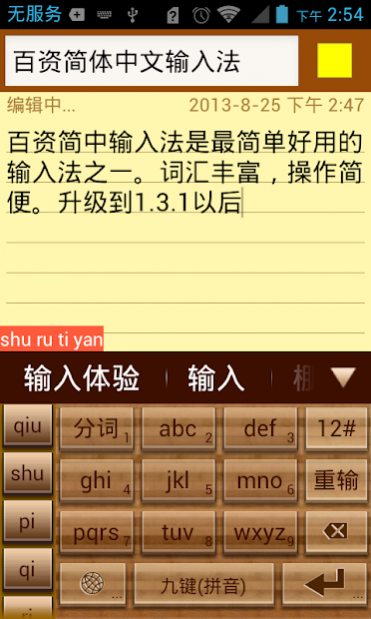


Linpus Keyboard is one of the most practical input method. It supports English, Chinese PinYin (Full layout and nine-grid simple layout) and handwriting input method.
The main feature of Linpus keyboard (IME) are:
* Simplified Chinese vocabulary error-correction feature;
* Simplified Chinese vocabulary fuzzy-input-method;
* Simplified Chinese vocabulary prediction;
* Simplified Chinese vocabulary memory feature;
* Simplified Chinese sentence input feature;
* Chinese and English mixed input support;
* English prediction and next word prediction;
* Local address book contact feature;
* Voice input method;
* Handwriting input method, support full screen;
* Keyboard layout candidate view fling animation support;
* Keyboard layout candidate view gesture support;
* Emoji and Emotion support.
Note: To be used on your Android device(Smart Phone or Tablet), LinpusIME must be enabled in "Settings"->"Language & keyboard settings".
Search key words:
IME LinpusIME PinYin Linpus voice input method useful practical contact touch key keyboard handwriting
v1.2.9 Update List:
1. Adjust the 9-Grid layout, make it more beautiful;
2. Add layout button size setting;
3. Add pink theme and delete Chinese new year theme;
4. Fix rotation in handwriting layout will crash issue.
v1.2.2 Update List:
1. Add auto correction mechanism;
2. Add handwriting half and full screen switch;
3. In the tablet split keyboard add 9-Grid digits;
4. Add wood theme and China new year theme.
v1.2.1 Update List:
1. Add English next word prediction;
2. Add emotion button on candidate view bar;
3. Change symbol layout and switching SPEC.
v1.2.0 Update List:
1. Add handwriting setting: user can select the trace color;
2. Add direction pad in candidate view to easier edit text;
3. Modify punctuation: easier to use;
4. Add some new words;
5. Fix XML parse error issue.
About Simplified Chinese Keyboard
The company that develops Simplified Chinese Keyboard is Linpus Technologies, Inc.. The latest version released by its developer is 1.8.6.
To install Simplified Chinese Keyboard on your Android device, just click the green Continue To App button above to start the installation process. The app is listed on our website since 2018-12-25 and was downloaded 0 times. We have already checked if the download link is safe, however for your own protection we recommend that you scan the downloaded app with your antivirus. Your antivirus may detect the Simplified Chinese Keyboard as malware as malware if the download link to com.linpusime.android.linpuskbd is broken.
How to install Simplified Chinese Keyboard on your Android device:
- Click on the Continue To App button on our website. This will redirect you to Google Play.
- Once the Simplified Chinese Keyboard is shown in the Google Play listing of your Android device, you can start its download and installation. Tap on the Install button located below the search bar and to the right of the app icon.
- A pop-up window with the permissions required by Simplified Chinese Keyboard will be shown. Click on Accept to continue the process.
- Simplified Chinese Keyboard will be downloaded onto your device, displaying a progress. Once the download completes, the installation will start and you'll get a notification after the installation is finished.
Program Details
System requirements
Download information
Pricing
Version History
version 1.8.6
posted on 2018-12-25
improve stability
version 1.7.6
posted on 2014-12-09
v1.7.6,1) Added the Homebase Lock Screen SDK,v1.7.5,1) Fix UI issue.,v1.7.4,1) Fix clash issue "No Such Method" when use Android 2.2 and 2.3,Note: Long press the "Enter" key can quick into setting page.
version 1.2.9
posted on 2013-05-31
Several fixes and updates
Disclaimer
Official Google Play Link
We do not host Simplified Chinese Keyboard on our servers. We did not scan it for viruses, adware, spyware or other type of malware. This app is hosted by Google and passed their terms and conditions to be listed there. We recommend caution when installing it.
The Google Play link for Simplified Chinese Keyboard is provided to you by apps112.com without any warranties, representations or guarantees of any kind, so access it at your own risk.
If you have questions regarding this particular app contact the publisher directly. For questions about the functionalities of apps112.com contact us.
